
Drill Log Digitization
Drill log OCR: why standard OCR fails on drill logs — and what works instead
Every exploration company sits on the same problem: cabinets and assessment files full of historical drill logs — typewritten diamond drilling logs from the 1970s and 80s, handwritten borehole records, faded photocopies — that modern modeling software can’t touch. The obvious first idea for digitizing them is OCR: scan the pages, recognize the characters, get a spreadsheet. If you’ve tried to digitize drill logs that way, you already know how it ends.
Where traditional OCR breaks down
OCR was built to convert clean printed characters into text. Drill logs violate every one of its assumptions:
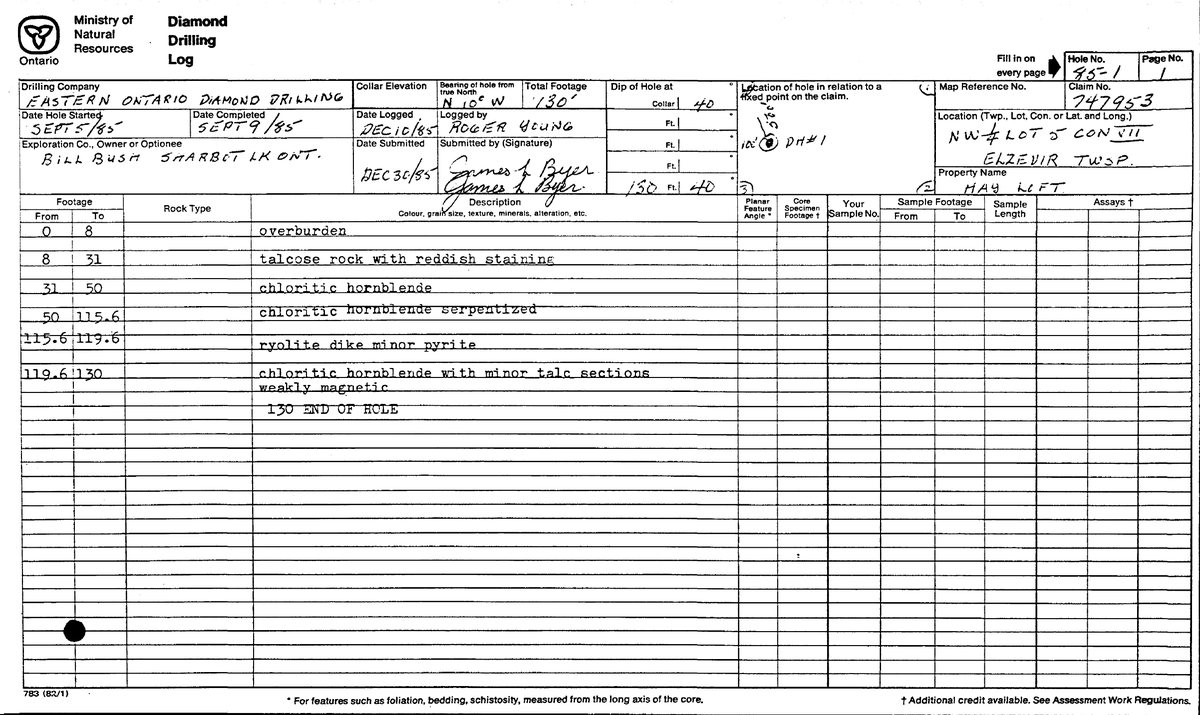
- Handwriting. Collar details, depth intervals, and whole description columns are field-written. Character-level OCR produces gibberish from cursive it was never trained on.
- Tables that span pages. A single hole’s lithology log routinely runs five, ten, twenty pages. OCR reads each page in isolation — it has no concept of a table continuing, so you get fragments to reassemble by hand.
- Inconsistent forms. Every drilling company, ministry, and decade used a different layout. Template-based extraction tuned for one form fails on the next box of files.
- No geological context. OCR doesn’t know that “85-2” is a hole ID, that 92.5–140.0 is a depth interval, or that “qtz-carb veining w/ py” is a mineralization note. It emits characters, not data.
- Degraded scans. Fifty-year-old photocopies of carbon copies — skewed, stamped, annotated in margins. Recognition accuracy collapses exactly where the archives matter most.
What works: vision AI that understands drill log structure
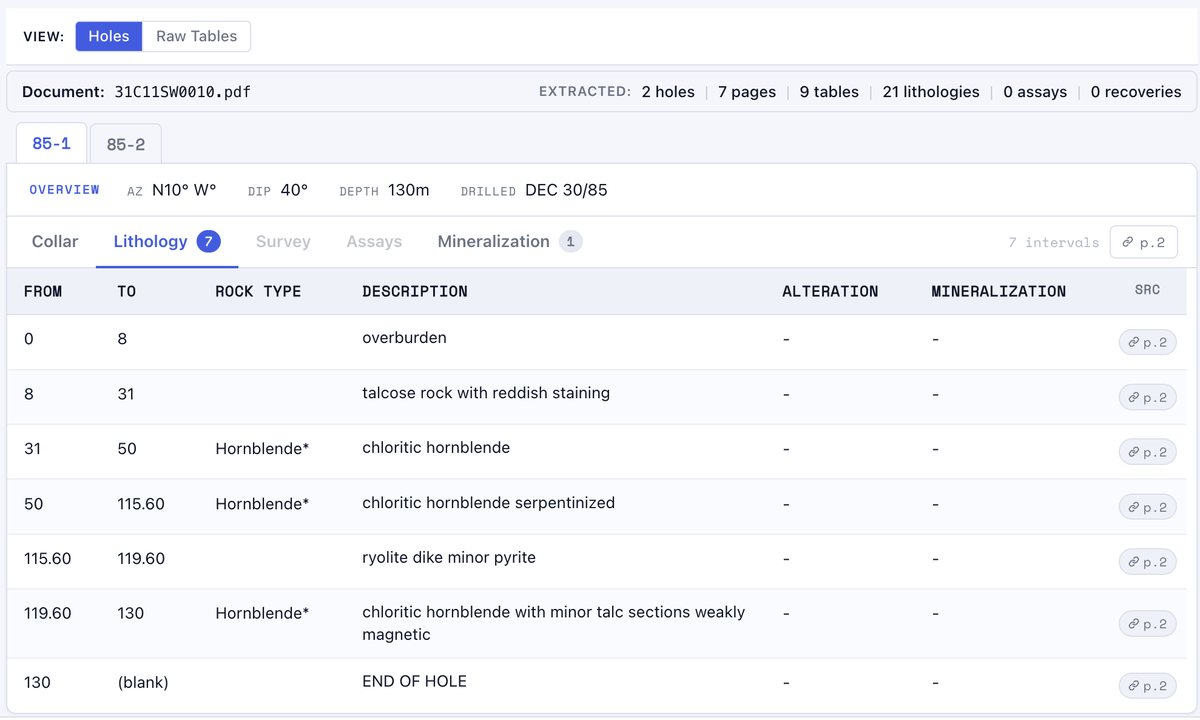
LogDog takes a different approach. Instead of recognizing characters, vision-language AI reads each page the way a geologist does — whole, in context. It classifies what kind of page it’s looking at (collar sheet, lithology log, assay certificate, survey table), extracts the tables with their structure intact, reads handwritten entries using the surrounding form and geological vocabulary to resolve them, stitches multi-page tables back into continuous intervals, and groups everything by drill hole. A review agent then audits the result against the document itself — checking declared hole IDs, depth continuity, and value plausibility — before you ever see it.
What you get out
Not raw text — a drillhole database: collar, survey, lithology, and assay tables per hole, exportable as Excel, CSV, or JSON, including a consolidated format that follows the industry-standard structure used by Leapfrog, Micromine, Surpac, and Datamine. Handwritten descriptions arrive as readable fields. Inferred values are flagged so your QA has an audit trail back to the source page.
See it on your own logs — not ours.
Drop any drill log PDF. First pages extracted free. No email required.
Try It FreeCommon questions
Can OCR read handwritten drill logs?
Traditional OCR generally can’t — it’s trained on printed characters, and field-written cursive defeats it. Vision-language models read handwriting in context, using the form structure, geological vocabulary, and depth sequence to resolve ambiguous characters the way a human reader does.
What’s the difference between drill log OCR and AI extraction?
OCR converts pixels to characters with no understanding of the document. AI extraction classifies pages, preserves table structure, joins tables across pages, groups records by hole, and outputs typed fields — collar coordinates, intervals, lithology, assays — instead of a wall of text.
How do I try it on my own drill logs?
Drop a PDF on the homepage — the first pages are extracted free, no email required. You’ll see your own document as structured tables in minutes.